
Peter, your friend, is an assistant professor who teaches at a local university in your town.\nOne day he came to you with a big problem; it seems that someone has been stealing the exams questions from his laptop.
\nEven though he isn't a computer professional, he knows the basic security practices. He never lets strangers use his laptop, always locks his machine when he leaves his desk, and he never downloads applications and .exe files from untrusted sources.
\nPeter, however, doesn't know that .exe files aren't the only source of threat. He usually accepts students' homework via e-mail.
\nNaturally, he downloads the homework files on his machine so he can evaluate them. After you told Peter that malicious content could hide in a Microsoft Office file, he remembered that the incidents started after he downloaded an excel homework file on his machine from two of his students.
\nPeter gave you the file and asked you to prove that the file is malicious so that he can take the appropriate procedures against the suspected students.
\nYou can find the under investigation Office document at C:\\DFP\\Labs\\Module3\\Lab6\\test.xls. \nUse Exiftool to examine the excel file metadata and extract the author.
\nUse Officemalscanner to scan the excel file for macro scripts, known exploits, encrypted content and PE headers.
\nWrite down the index where the Malicious object was found.
\nUse Disview to display the malicious object's assembly code. Then, extract it using MalHost-Setup to an exe file. Scan the file with Antivirus to check the malware type.
", "published_date": "2020-10-20T15:32:26Z", "solutions": "# SOLUTIONS\n\n## Task 1: Extracting metadata\n\nYou can find the under investigation files at **C:\\\\DFP\\\\Labs\\\\Module3\\\\Lab6\\\\test.xls**.\n\nFor a general overview of the file, we can use the **exiftool.exe** at [C:\\DFP\\Tools\\Metadata]. After running the command and passing the file name as a parameter.\n\n```\n# cd C:\\DFP\\Tools\\Metadata\n# \"exiftool(-k).exe\" C:\\DFP\\Labs\\Module3\\Lab6\\test.xls\n```\n\n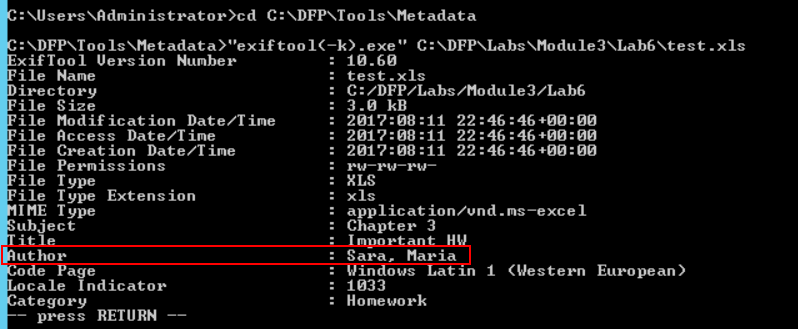\n\n## Task 2: Scanning for Malicious content\n\nThe **Officemalscanner.exe** located at [C:\\DFP\\Tools\\Metadata\\Docs\\] is a tool commonly used to perform an in-depth scan on Microsoft office documents. The tool can scan the file for VB scripts and known exploit signatures.\n\nIt can also scan the document looking for PE headers even if they are encoded. We'll use the **Info** option to scan for VB-Macro Scripts.\n\n```\n# cd C:\\DFP\\Tools\\Metadata\\Docs\\\n# OfficeMalScanner.exe C:\\DFP\\Labs\\Module03\\Lab6\\test.xls info\n```\n\n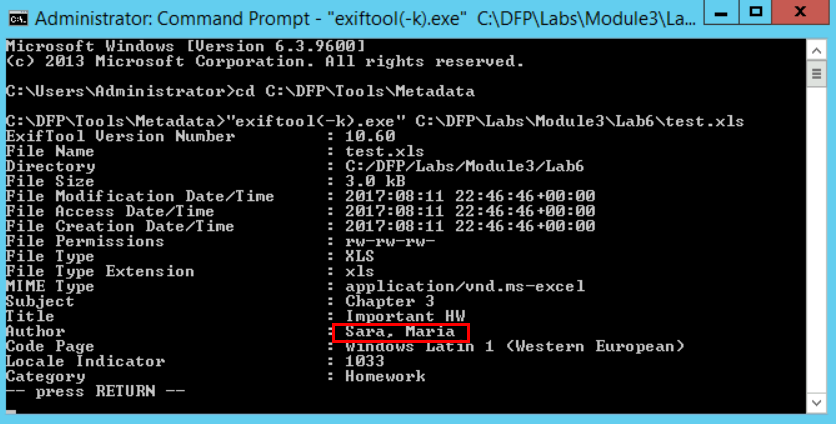\n\nIt is important to remember that many of the tools we mentioned actually open the file in order to extract the requested data from it. This means that precautions should be taken before starting the analysis.\n\nThe document doesn't seem to contain VB-Macro scripts.\n\nWe'll use the **scan** option to look for known malicious signatures and PE header.\n\n```\n# OfficeMalScanner.exe C:\\DFP\\Labs\\Module3\\Lab6\\test.xls scan\n```\n\n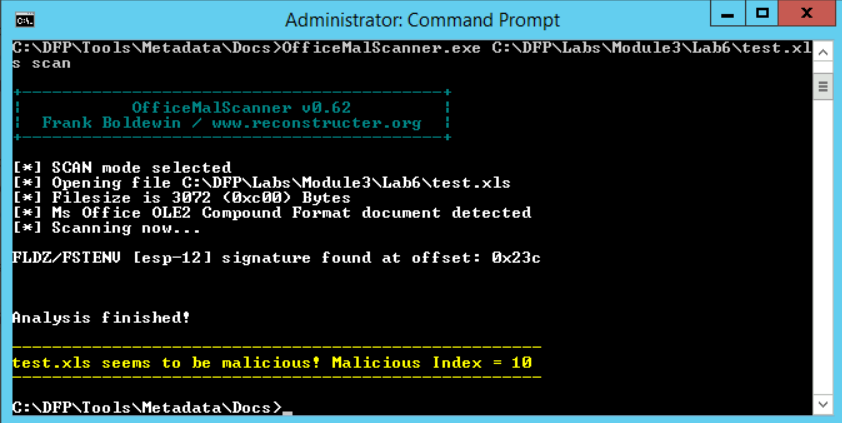\n\nWe can see that the tool found something malicious within. One of the tool's features is that it assigns a malicious index to each file. This index indicates what the possible content is. Anything above 10 is considered dangerous. If the number is between 10 and 20, it means a code signature has been found inside. If it is above 20, then it means a whole executable is probably embedded within.\n\nBased on that and the previous output, it seems that the tool has found a code within the document.\n\nEven though we found what we're looking for, it is worth checking if there is any encrypted content.\nBy using the **brute** flag, we can ask the scanner to try different decoders and see if any of them works.\n\n```\n# OfficeMalScanner.exe C:\\DFP\\Labs\\Module3\\Lab6\\test.xls scan brute\n```\n\n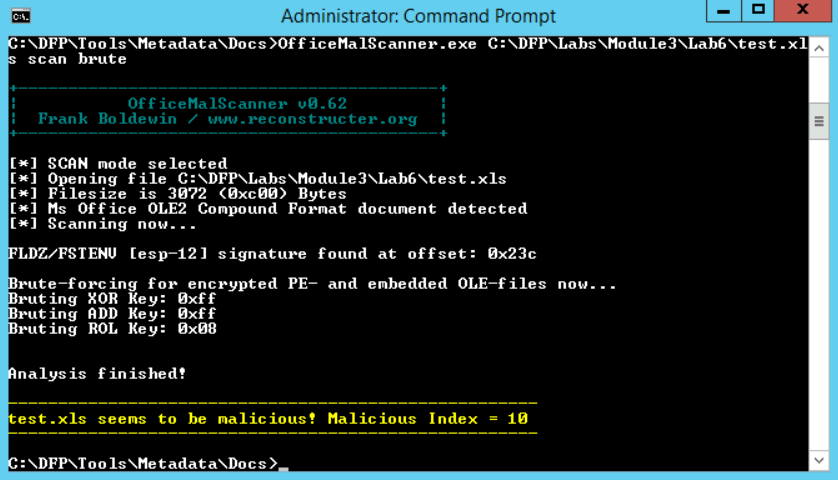\n\nIn order to tell what the hidden payload is, we need to extract it first. The report mentioned that the suspicious code was found at the index **0x23C**. To extract the complete code, we can add the **debug** option instead of going and extracting it manually.\n\n```\n# OfficeMalScanner.exe C:\\DFP\\Labs\\Module3\\Lab6\\test.xls scan debug\n```\n\n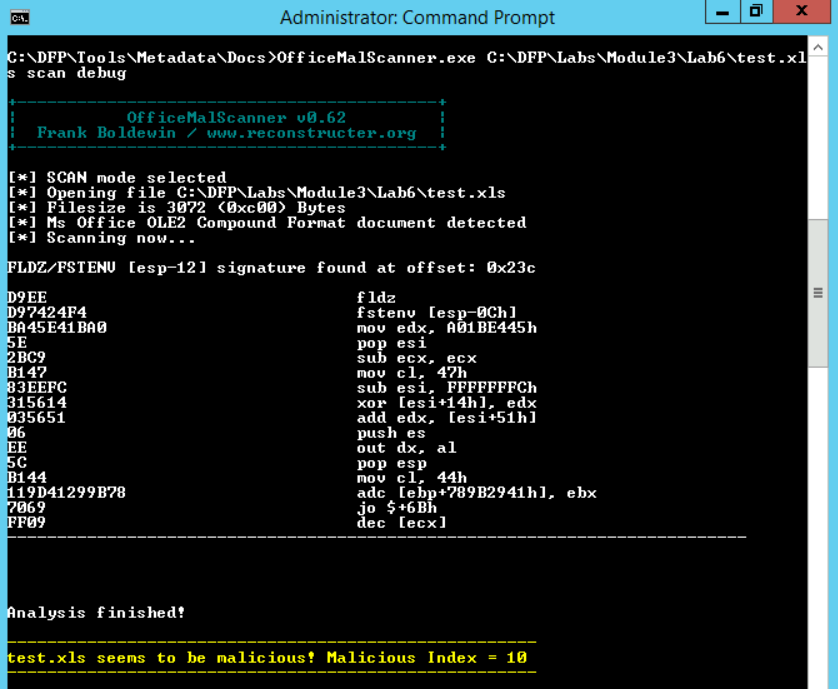\n\n## Task 3: Examining the malicious embedded code\n\nWe can use the **DisView.exe** tool which comes alongside officemalscanner.exe. All we have to do is to provide the file name and the offset where the suspicious code was found.\n\n```\n# cd C:\\DFP\\Tools\\Metadata\\Docs\\\n# DisView.exe C:\\DFP\\Labs\\Module3\\Lab6\\test.xls 0x23c\n```\n\n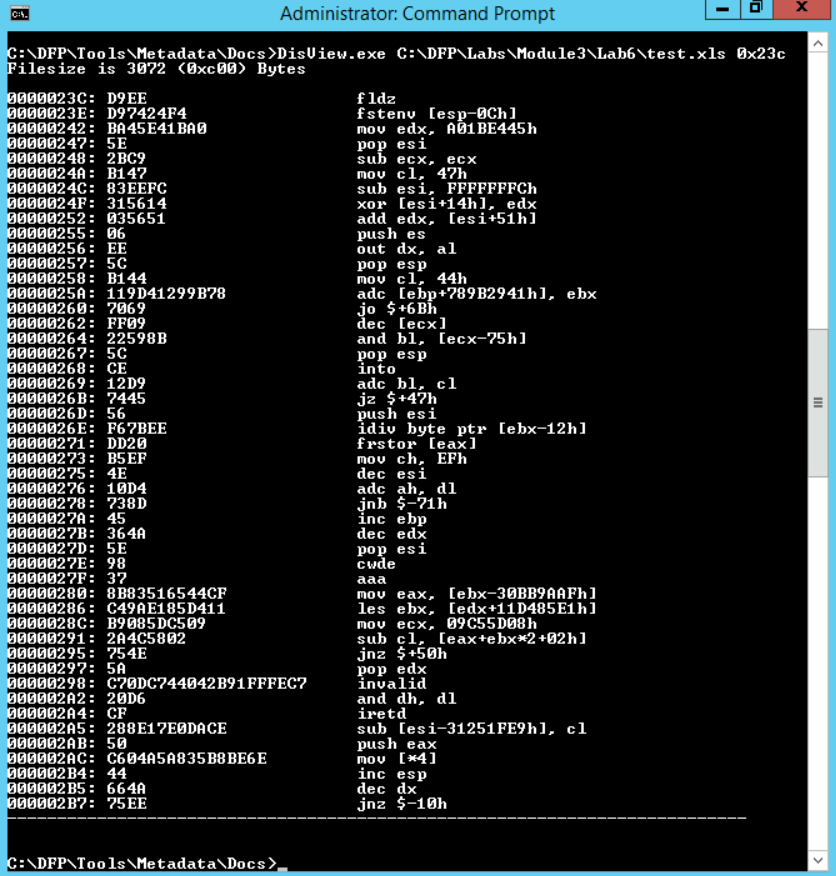\n\nThe easiest way to analyze the file without tracing the assembly code is to turn it into an exe file. Scanning an exe file may sometimes be easier than tracing assembly code.\n\nWe can use the **Malhost-Setup.exe** tool to perform this task. The tool also comes in the same package with officemalscanner.exe. To run the tool, we need to invoke it, pass the output exe file and the offset of the shell code as parameters.\n\n```\n# cd C:\\DFP\\Tools\\Metadata\\Docs\\\n# MalHost-Setup.exe C:\\DFP\\Labs\\Module3\\Lab6\\test.xls malcode.exe 0x23c\n```\n\n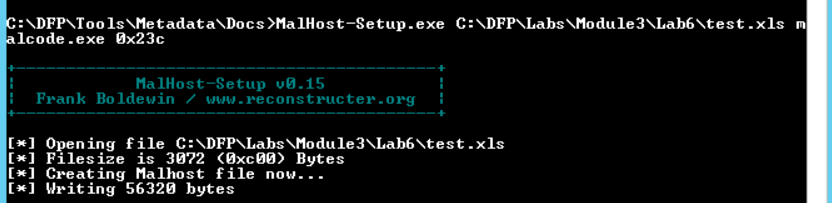\n\nThe tool will generate the exe file in its local directory.\n\n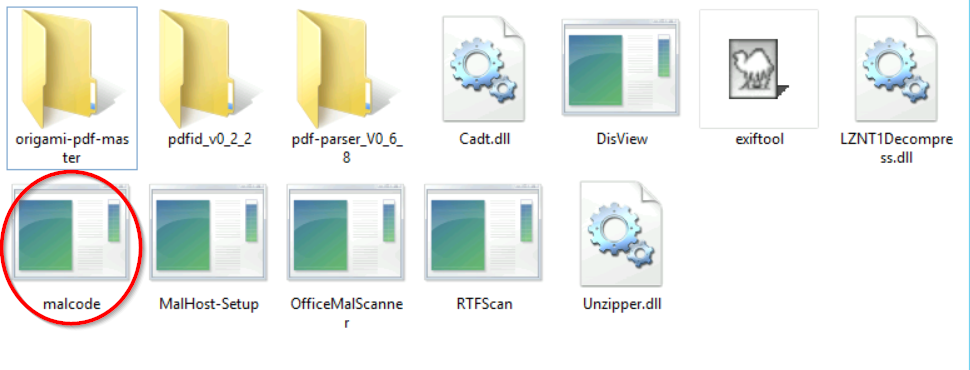\n\nNow that we have extracted the suspicious code, we can either analyze it with ClamWin AV.\n\n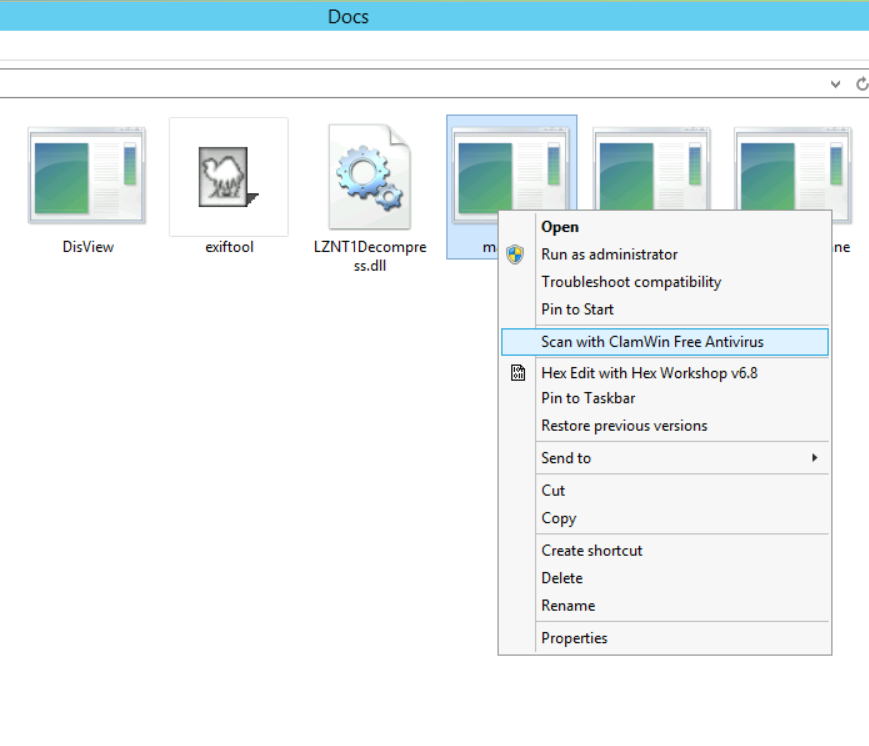\n\n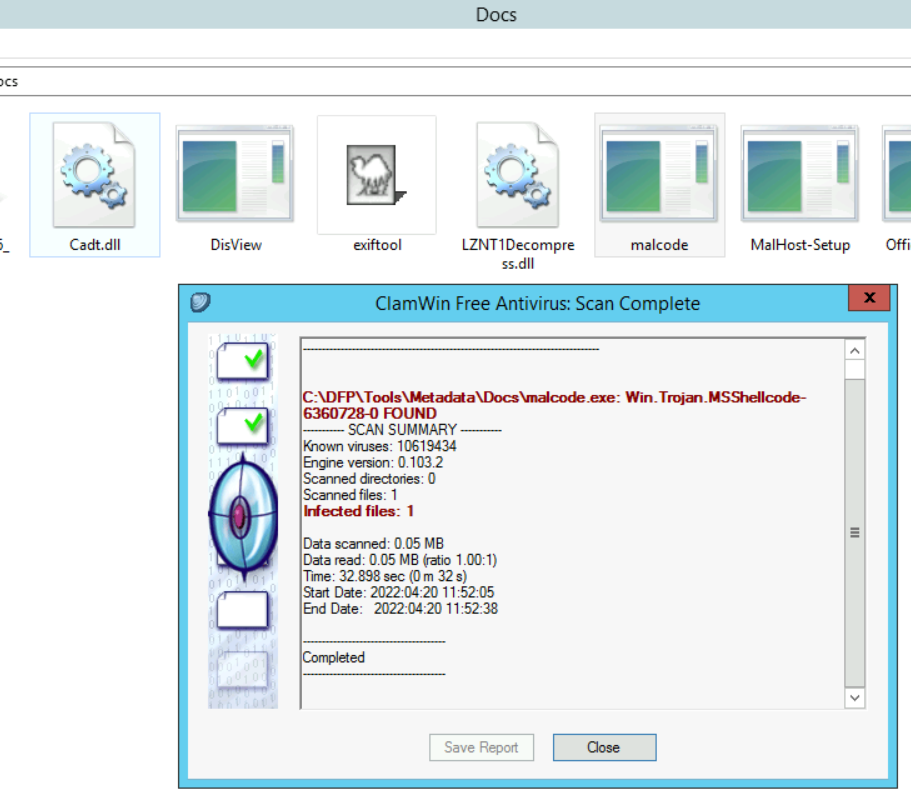\n\nThe AV detects the malware as a Trojan.", "solutions_html": "You can find the under investigation files at C:\\DFP\\Labs\\Module3\\Lab6\\test.xls.
\nFor a general overview of the file, we can use the exiftool.exe at [C:\\DFP\\Tools\\Metadata]. After running the command and passing the file name as a parameter.
\n# cd C:\\DFP\\Tools\\Metadata\n# \"exiftool(-k).exe\" C:\\DFP\\Labs\\Module3\\Lab6\\test.xls
The Officemalscanner.exe located at [C:\\DFP\\Tools\\Metadata\\Docs] is a tool commonly used to perform an in-depth scan on Microsoft office documents. The tool can scan the file for VB scripts and known exploit signatures.
\nIt can also scan the document looking for PE headers even if they are encoded. We'll use the Info option to scan for VB-Macro Scripts.
\n# cd C:\\DFP\\Tools\\Metadata\\Docs\\\n# OfficeMalScanner.exe C:\\DFP\\Labs\\Module03\\Lab6\\test.xls info
It is important to remember that many of the tools we mentioned actually open the file in order to extract the requested data from it. This means that precautions should be taken before starting the analysis.
\nThe document doesn't seem to contain VB-Macro scripts.
\nWe'll use the scan option to look for known malicious signatures and PE header.
\n# OfficeMalScanner.exe C:\\DFP\\Labs\\Module3\\Lab6\\test.xls scan
We can see that the tool found something malicious within. One of the tool's features is that it assigns a malicious index to each file. This index indicates what the possible content is. Anything above 10 is considered dangerous. If the number is between 10 and 20, it means a code signature has been found inside. If it is above 20, then it means a whole executable is probably embedded within.
\nBased on that and the previous output, it seems that the tool has found a code within the document.
\nEven though we found what we're looking for, it is worth checking if there is any encrypted content.\nBy using the brute flag, we can ask the scanner to try different decoders and see if any of them works.
\n# OfficeMalScanner.exe C:\\DFP\\Labs\\Module3\\Lab6\\test.xls scan brute
In order to tell what the hidden payload is, we need to extract it first. The report mentioned that the suspicious code was found at the index 0x23C. To extract the complete code, we can add the debug option instead of going and extracting it manually.
\n# OfficeMalScanner.exe C:\\DFP\\Labs\\Module3\\Lab6\\test.xls scan debug
We can use the DisView.exe tool which comes alongside officemalscanner.exe. All we have to do is to provide the file name and the offset where the suspicious code was found.
\n# cd C:\\DFP\\Tools\\Metadata\\Docs\\\n# DisView.exe C:\\DFP\\Labs\\Module3\\Lab6\\test.xls 0x23c
The easiest way to analyze the file without tracing the assembly code is to turn it into an exe file. Scanning an exe file may sometimes be easier than tracing assembly code.
\nWe can use the Malhost-Setup.exe tool to perform this task. The tool also comes in the same package with officemalscanner.exe. To run the tool, we need to invoke it, pass the output exe file and the offset of the shell code as parameters.
\n# cd C:\\DFP\\Tools\\Metadata\\Docs\\\n# MalHost-Setup.exe C:\\DFP\\Labs\\Module3\\Lab6\\test.xls malcode.exe 0x23c
The tool will generate the exe file in its local directory.
\n
Now that we have extracted the suspicious code, we can either analyze it with ClamWin AV.
\n

The AV detects the malware as a Trojan.
", "flags": [], "min_points_to_pass": null, "access_type": "default", "user_status": "unstarted", "user_lab_status": null, "user_status_modified": null, "user_flags": [], "global_running_session": null }