
A forensic image of a suspect's drive was taken for analysis, in order to locate if any pornographic material was stored on the suspect's computer. For this reason, you were asked to analyze the forensic image of the drive and explain if such material was stored there or not. You will also be required to identify when the files were deleted and where they existed before being deleted. The suspect claims that they did not have any (NOTE: we are considering kitten pics as pornographic)!
\nThe evidence given is a forensic image of an NTFS drive. You can find that image at C:\\DFP\\Labs\\Module6\\Lab17\\RecycleBin
\nIn this task, you are required to mount the forensic image [located at C:\\DFP\\Labs\\Module6\\Lab17\\RecycleBin] as a drive, in order to use your tool for the analysis. You can use different tools, but we prefer that you do it using FTK Imager [You can find it on the Desktop].
\nIn this task, you are required to analyze the Windows Recycle Bin and prove that the files of interest were truly deleted by this suspect. You are also required to prove the date of deletion, and the file location too. Rifiuti2 [located at C:\\DFP\\Tools\\Windows\\rifiuti2-0.6.1-win] will certainly prove handy for this task.
\nNote: each drive will have their own recycle bin.
\n[DRIVE Letter]:\\$Recycle.Bin
", "published_date": "2020-10-20T15:32:26Z", "solutions": "# SOLUTIONS\n\n## Task 1 - Mounting the Forensic Evidence as a Drive\n\nAfter opening FTK Imager, go to **File** **-> Image mounting** and then, select the forensic image. Before you click the mount button, make sure you select an unused drive letter to mount the forensic image there.\n\nThe options to select could be like this:\n\n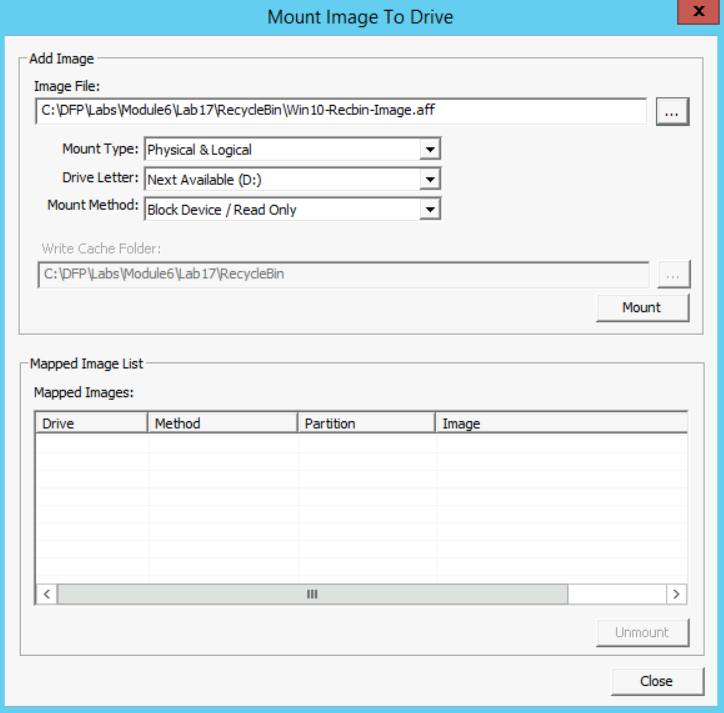\n\n## Task 2 - Analyzing Windows Recycle Bin Using Rifiuti2\n\nLuckily, this suspect didn't know about the facts below:\n\n1. Each drive has its own \"Recycle.bin\" directory.\n2. Each user will have a directory with his SID under the recycle bin.\n\nSo, when you find a file deleted within the recycle bin, you can easily identify which user deleted that file, because of the abovementioned directory within the recycle bin, that has been named with the user's SID. In this case, the SID is \"S-1-5-21-1934330275-1690924818-3103663869-1001\" (identified from previous labs or it could be given).\n\nAlso, it seems that the user didn't know that all the deleted files would go to a directory in that specific drive and not to the main recycle bin that is within the C: system drive. Files were deleted from the X: drive, which seems to be the drive he/she used to store his/her pornographic material. Before we continue, if we just add the evidence to the FTK Imager tool as an evidence and then open the $Recycle.bin directory on the drive, we will find the following:\n\n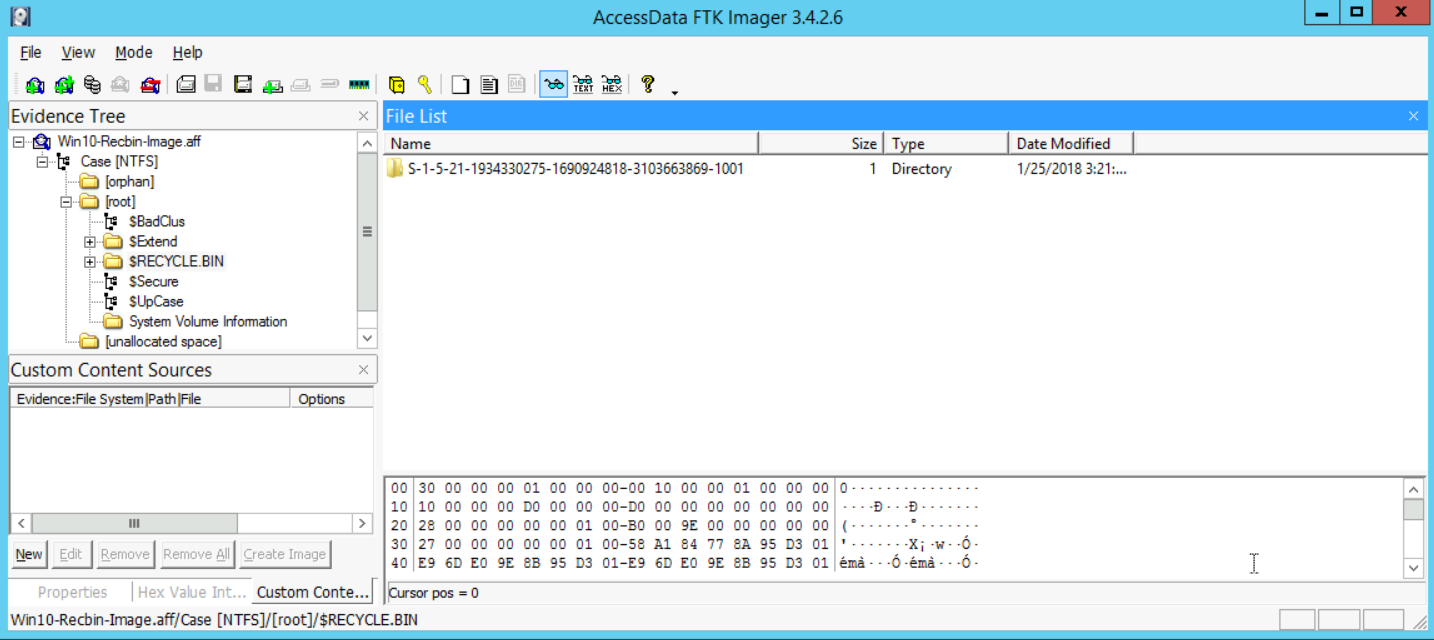\n\nThis proves that the user with the SID number \"S-1-5-21-1934330275-1690924818-3103663869-1001\" truly deleted something (not known yet). Now, if we open that directory and dive into the recycle bin directory there, we will find the following:\n\n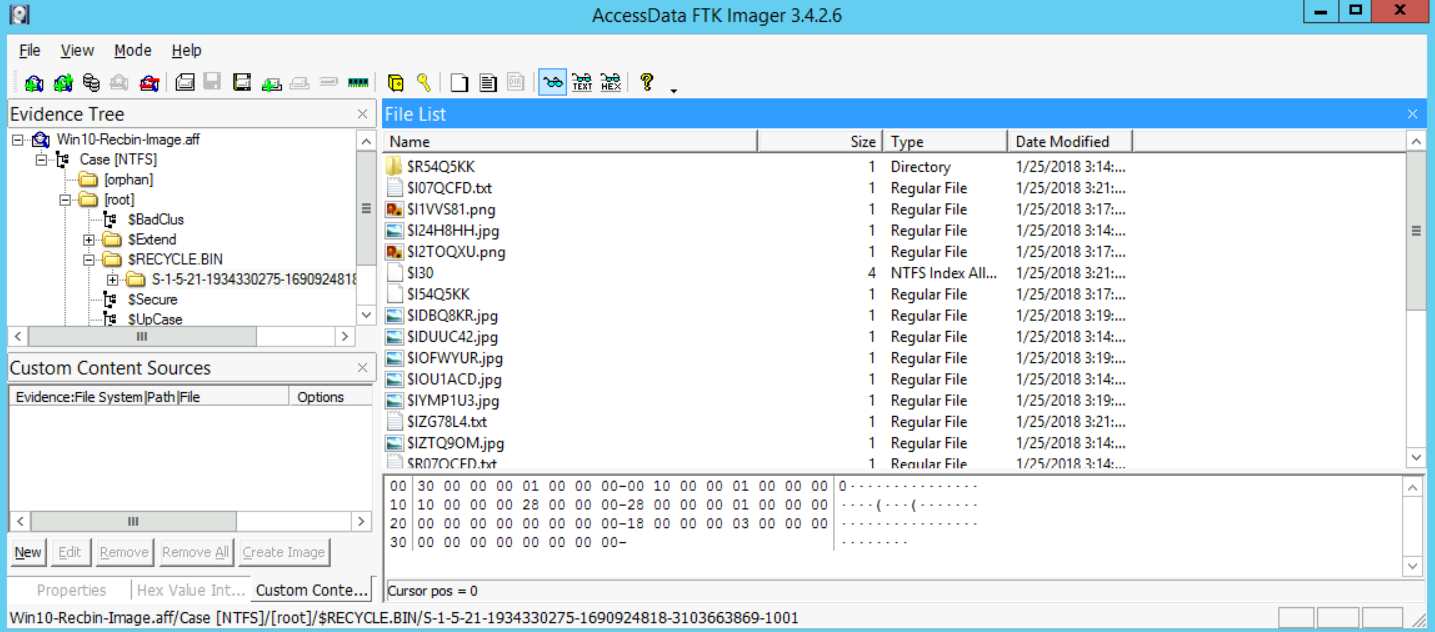\n\nIf you recall from the course, whenever you delete a file on a Windows Vista and newer system, the Windows operating system will have two files to reference that:\n\n1. The $I file -> this represents the metadata of the file and when was it deleted\n2. The $R file -> this holds the \"meat\" or the true content of the file\n\nSo here, we see the files that have been deleted. We can also select one of them to see maybe what it holds. So, selecting, for example, the $I24H8HH.jpg file would give us the following:\n\n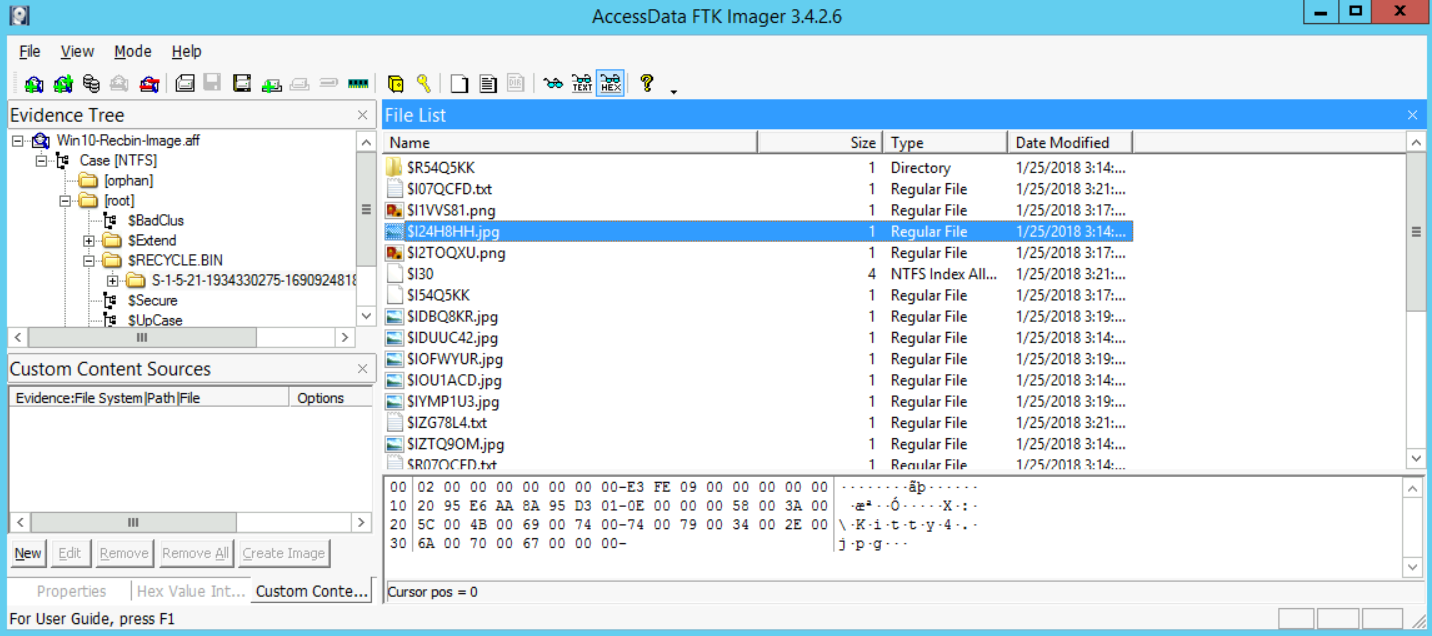\n\nWe have proof now that there are files that have been deleted. Now, let's move on to our analysis. To do that, all we need to do is analyze that directory using the tool rifiuti-vista.exe, which is the version that could deal with Windows Vista and newer systems (7, 8, 8.1, and 10).\n\nStart your command prompt (**[as an Administrator]**) and go to the folder that contains your tools:\n\n```\n# cd c:\\DFP\\Tools\\Others\\rifiuti2-0.6.1-win\\x64\n```\n\nThe reason I went to the x64 directory, is since we are using a Windows 64-bit version. Please note, that 32-bit tools could run on a 64-bit system, but the opposite is not possible.\n\nNow, all you need to do is run the tool like this if you want to read the help that comes with the tool:\n\n```\n# rifiuti-vista.exe -h\n```\n\nFinally, now that we know how to use the tool, execute the following:\n\n```\n# rifiuti-vista.exe D:\\$RECYCLE.BIN\\S-1-5-21-1934330275-1690924818-3103663869-1001\\\n```\n\nI have mounted the forensic image on the U: drive letter, and then pointed rifiuti-vista.exe to the exact directory I am interested in analyzing. With that done, I got the following results:\n\n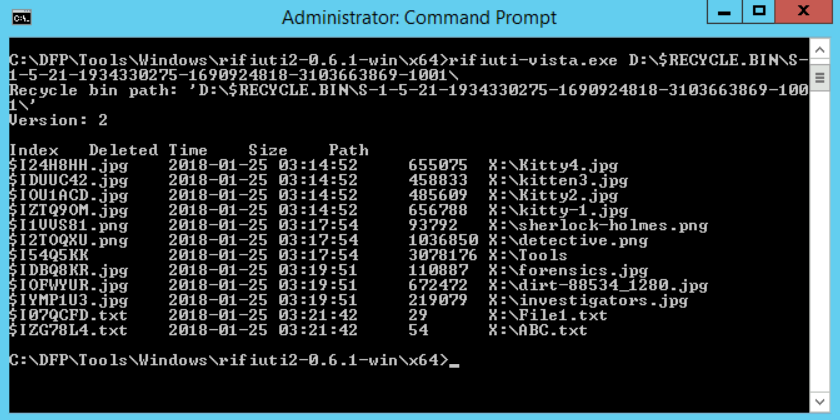\n\nFrom the results, it is clear that all the pornographic material (kitten photos) were deleted from the X: drive and all of them were deleted on 2018-01-25 03:14:52. Also, their true names were:\n\n- Kitty4.jpg\n- kitten3.jpg\n- Kitty2.jpg\n- kitty-1.jpg\n\nSo, that's it. We managed to prove that the suspect was lying, they did have pornographic material and did truly delete those files.", "solutions_html": "After opening FTK Imager, go to File -> Image mounting and then, select the forensic image. Before you click the mount button, make sure you select an unused drive letter to mount the forensic image there.
\nThe options to select could be like this:
\n
Luckily, this suspect didn't know about the facts below:
\nSo, when you find a file deleted within the recycle bin, you can easily identify which user deleted that file, because of the abovementioned directory within the recycle bin, that has been named with the user's SID. In this case, the SID is \"S-1-5-21-1934330275-1690924818-3103663869-1001\" (identified from previous labs or it could be given).
\nAlso, it seems that the user didn't know that all the deleted files would go to a directory in that specific drive and not to the main recycle bin that is within the C: system drive. Files were deleted from the X: drive, which seems to be the drive he/she used to store his/her pornographic material. Before we continue, if we just add the evidence to the FTK Imager tool as an evidence and then open the $Recycle.bin directory on the drive, we will find the following:
\n
This proves that the user with the SID number \"S-1-5-21-1934330275-1690924818-3103663869-1001\" truly deleted something (not known yet). Now, if we open that directory and dive into the recycle bin directory there, we will find the following:
\n
If you recall from the course, whenever you delete a file on a Windows Vista and newer system, the Windows operating system will have two files to reference that:
\nSo here, we see the files that have been deleted. We can also select one of them to see maybe what it holds. So, selecting, for example, the $I24H8HH.jpg file would give us the following:
\n
We have proof now that there are files that have been deleted. Now, let's move on to our analysis. To do that, all we need to do is analyze that directory using the tool rifiuti-vista.exe, which is the version that could deal with Windows Vista and newer systems (7, 8, 8.1, and 10).
\nStart your command prompt ([as an Administrator]) and go to the folder that contains your tools:
\n# cd c:\\DFP\\Tools\\Others\\rifiuti2-0.6.1-win\\x64The reason I went to the x64 directory, is since we are using a Windows 64-bit version. Please note, that 32-bit tools could run on a 64-bit system, but the opposite is not possible.
\nNow, all you need to do is run the tool like this if you want to read the help that comes with the tool:
\n# rifiuti-vista.exe -hFinally, now that we know how to use the tool, execute the following:
\n# rifiuti-vista.exe D:\\$RECYCLE.BIN\\S-1-5-21-1934330275-1690924818-3103663869-1001\\I have mounted the forensic image on the U: drive letter, and then pointed rifiuti-vista.exe to the exact directory I am interested in analyzing. With that done, I got the following results:
\n
From the results, it is clear that all the pornographic material (kitten photos) were deleted from the X: drive and all of them were deleted on 2018-01-25 03:14:52. Also, their true names were:
\nSo, that's it. We managed to prove that the suspect was lying, they did have pornographic material and did truly delete those files.
", "flags": [], "min_points_to_pass": null, "access_type": "default", "user_status": "unstarted", "user_lab_status": null, "user_status_modified": null, "user_flags": [], "global_running_session": null }