
The network is being scanned by various techniques for open ports and live IPs. Your job is to determine the types of scans and their target and, if possible, the source.
\nAnalyze the first provided PCAP file [located at Desktop/Module7/Lab21/1.pcapng] and try to identify:
\nAnalyze the second provided PCAP file [located at Desktop/Module7/Lab21/2.pcapng]. Try to determine and write down the following.
\nFinally, analyze the third provided PCAP [located at Desktop/Module7/Lab21/idle.pcapng]. Try to determine and write down the following.
\nYou confronted the person whose IP you discovered in the analyzed traffic earlier. However, he denied that he has anything to do with it. After you examined his machine, it turned out to be an old Windows XP machine with no network scanning tools installed. How can you prove that the owner of this machine is being framed?
", "published_date": "2020-10-20T15:32:26Z", "solutions": "# Solutions\n\n## Task 1: Examine the First Captured File Named 1.pcapng\n\nLet's load the first provided PCAP file [located at **Desktop/Module7/Lab21/1.pcapng**] in Wireshark.\n\nWe know that most types of TCP scans start with a SYN message.\n\nAn attacker conducting Port scanning will likely be sending a large number of SYN segments.\nWe can filter for TCP messages with SYN Flags in Wireshark in order to identify the IP address of the attacker.\n\n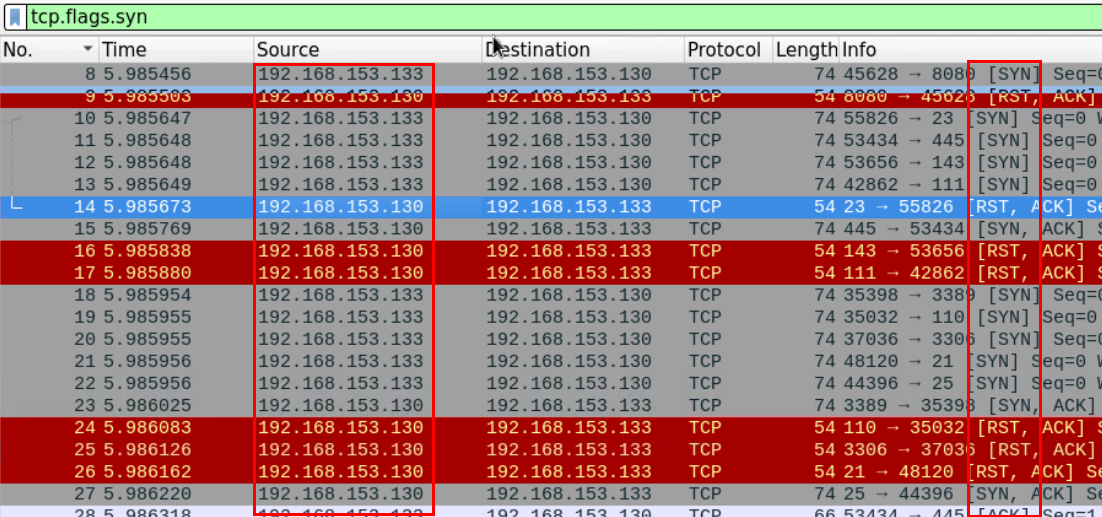\n\nAfter using the proper filter, we can see that most of the SYN segments are coming from the IP: **192.168.153.133**\n\nIn order to determine the type of scan, we need to examine at least one port being scanned. We can filter the traffic looking for segments going or coming from a certain port and examine how this port was scanned.\n\nFor this example will examine how Port 80 was scanned. Using filter `tcp.port==80`\n\n\n\nWe can see that the attacker has completed the three-way handshake before sending the RST segment to end the connection.\n\nThis suggests that this is a full TCP scan.\n\nWe can also verify that Port 80 was opened on the machine that was being scanned because the victim machine replied with SYN ACK message.\n\nTo examine more open ports we need to look for SYN-ACK messages which originated from the victim machine.\n\nUsing the proper Wireshark filter we can get all the messages which originated from open ports\n\n```\n(tcp.ack==1 and tcp.flags.syn==1) and ip.src==192.168.153.130\n```\n\n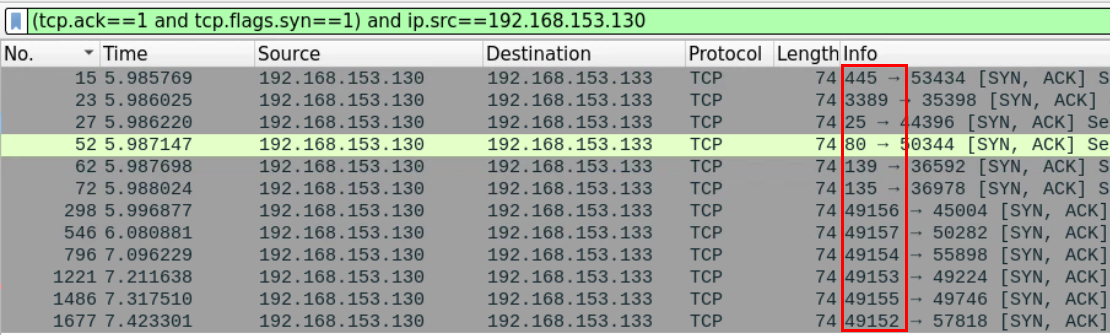\n\n## Task 2: Examine the Second Captured File Named 2.pcapng\n\nLet's now load the second provided PCAP file [located at **Desktop/Module7/Lab21/2.pcapng**] in Wireshark.\n\nTo examine the differences between this type of scan and the previous one, we need to examine how at least one port was scanned.\n\nLet's examine port 445 which is usually opened by default on most windows systems. Using filter `tcp.port==445`\n\n\n\nWe can see that the attacker terminated the connection immediately after receiving the SYN, ACK message from the client.\n\nThis suggests that this is a half-open scan where the attacker 192.168.153.133 is scanning 192.168.153.130.\n\nSame as before, we can examine the open ports by filtering the messages which originated from the server and have both the SYN and ACK flags set. \n\n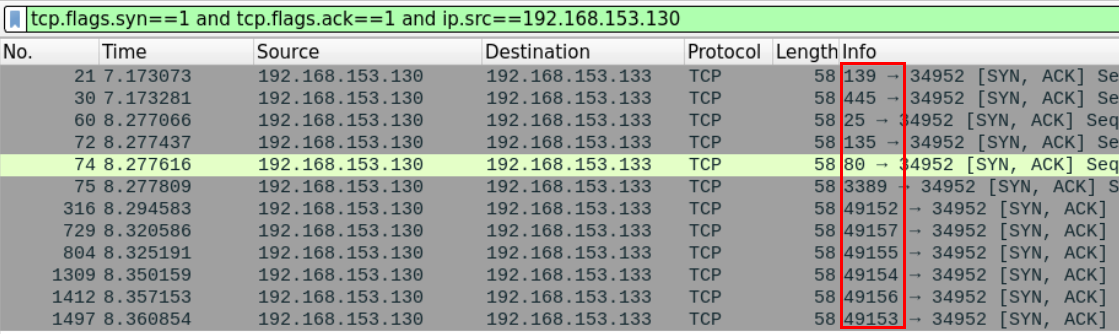\n\n## Task 3: Examine the Third Captured File Named Idle.pcapng\n\nLet's load the third provided PCAP file [located at **Desktop/Module7/Lab21/idle.pcapng**] in Wireshark.\n\nFrom the first look at it, this seems like the other typical scans we have examined earlier. We can use Wireshark filters to review the syn segments being sent\n\n```\ntcp.flags.syn==1 and tcp.flags.ack==0\n```\n\n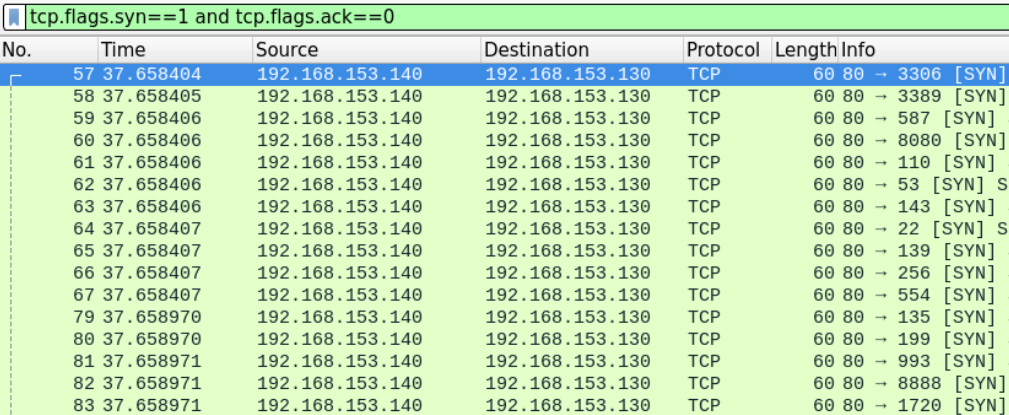\n\nWe can see that the machine with IP 192.168.153.140 seems to be scanning the 192.168.153.130 machine.\n\nFrom the first look at the transport layer headers there doesn't seem to be anything wrong just a typical half-open scan being conducted and the opened ports are replying with SYN, ACK messages.\n\n```\ntcp.flags.syn==1 and tcp.flags.ack==1 and ip.src==192.168.153.130\n```\n\n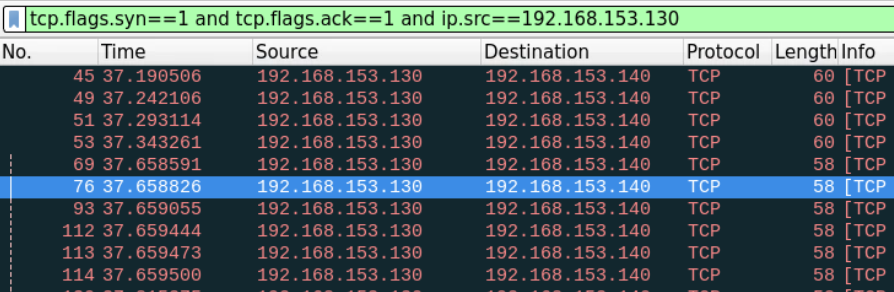\n\nThe only noticeable difference is the number of repeated segments being sent which we haven't seen when we examined the half-open scan in the previous task.\n\n## Task 4: Find a Way to Make Sure that the Identified IP is Actually the One of the Attacker \n\nIf what the owner of the 192.168.153.140 machine is saying is true, then there is someone forging packets, putting his address on it, and sending it on its behalf.\n\nOne way to prove that an impersonator exists in the network is to find two packets with the same Source IP address on them (zombie's IP) but with different machine-related headers such as the TTL and the MAC address.\n\nBasically, if we find two packets with the same Source IP address and different Mac addresses, this means that there are two different sources for those packets.\n\nLet's first filter and examine the SYN segments which have the zombie's IP address on it.\n\n```\nip.src==192.168.153.140\n```\n\n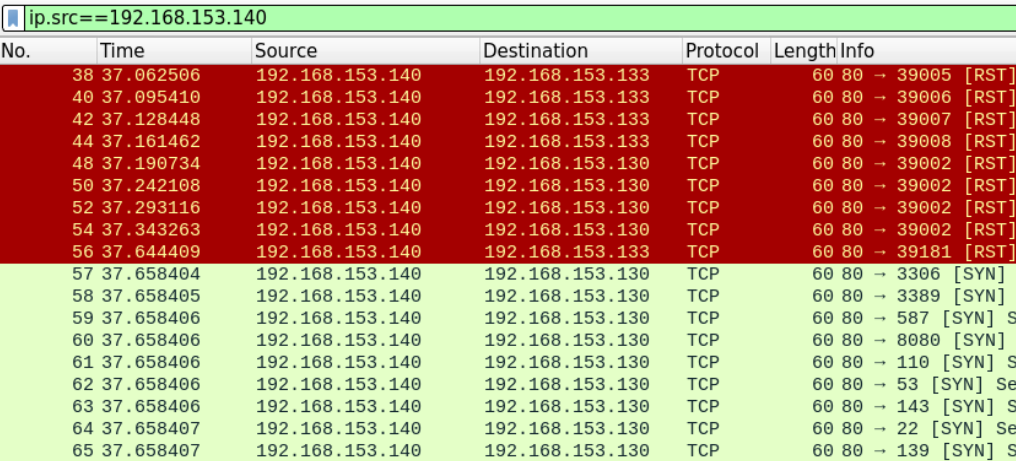\n\nWe'll examine two different segments (a SYN and a RST), frames 56 and 57 to verify whether they have been sent from the same machine or not.\n\n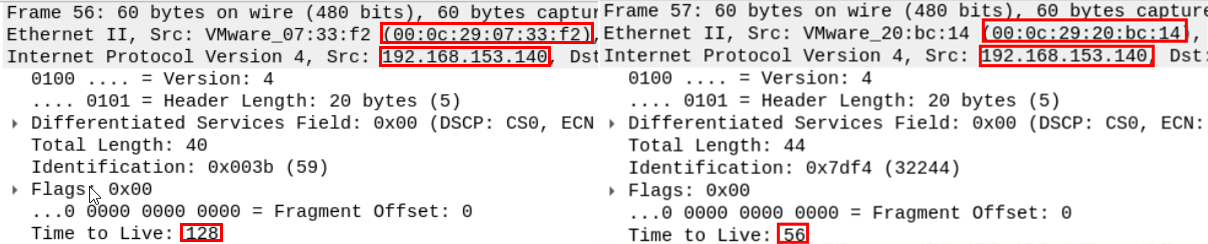\n\nBy listing the headers of the two messages, we can clearly see that there are many differences in machine-related fields between the two packets.\n\nFirst, even though the two packets have the same Source IP, they have a different source MAC address and different TTL, which is more than enough to suggest that the two packets originated from different network interface cards.\n\nIn order to find the true attacker behind this, we can use the MAC addresses we got to search the packet file for packets that have the same MAC but different IP addresses. Those packets should belong to the true attacker's machine.\n\nSince we know by now that this is a \"zombie scan\" attempt, there is no need to try and lookup both Mac addresses.\n\nWe know that the first step in a \"zombie scan,\" is when the attacker forges a SYN message with the zombies Source IP address on it.\n\nSo the MAC address on the forged SYN message the victim has received is the attacker's true Mac address.\n\nTo easily find the packet we're looking for, we can filter and look for packets which have the source Mac address we're looking for and doesn't have the zombie's IP address.\n\n```\neth.src==00:0c:29:20:bc:14 and !(ip.addr==192.168.153.140)\n```\n\n\n\nIt seems that the true attackers IP address is 192.168.153.133.", "solutions_html": "Let's load the first provided PCAP file [located at Desktop/Module7/Lab21/1.pcapng] in Wireshark.
\nWe know that most types of TCP scans start with a SYN message.
\nAn attacker conducting Port scanning will likely be sending a large number of SYN segments.\nWe can filter for TCP messages with SYN Flags in Wireshark in order to identify the IP address of the attacker.
\n
After using the proper filter, we can see that most of the SYN segments are coming from the IP: 192.168.153.133
\nIn order to determine the type of scan, we need to examine at least one port being scanned. We can filter the traffic looking for segments going or coming from a certain port and examine how this port was scanned.
\nFor this example will examine how Port 80 was scanned. Using filter tcp.port==80

We can see that the attacker has completed the three-way handshake before sending the RST segment to end the connection.
\nThis suggests that this is a full TCP scan.
\nWe can also verify that Port 80 was opened on the machine that was being scanned because the victim machine replied with SYN ACK message.
\nTo examine more open ports we need to look for SYN-ACK messages which originated from the victim machine.
\nUsing the proper Wireshark filter we can get all the messages which originated from open ports
\n(tcp.ack==1 and tcp.flags.syn==1) and ip.src==192.168.153.130
Let's now load the second provided PCAP file [located at Desktop/Module7/Lab21/2.pcapng] in Wireshark.
\nTo examine the differences between this type of scan and the previous one, we need to examine how at least one port was scanned.
\nLet's examine port 445 which is usually opened by default on most windows systems. Using filter tcp.port==445

We can see that the attacker terminated the connection immediately after receiving the SYN, ACK message from the client.
\nThis suggests that this is a half-open scan where the attacker 192.168.153.133 is scanning 192.168.153.130.
\nSame as before, we can examine the open ports by filtering the messages which originated from the server and have both the SYN and ACK flags set.
\n
Let's load the third provided PCAP file [located at Desktop/Module7/Lab21/idle.pcapng] in Wireshark.
\nFrom the first look at it, this seems like the other typical scans we have examined earlier. We can use Wireshark filters to review the syn segments being sent
\ntcp.flags.syn==1 and tcp.flags.ack==0
We can see that the machine with IP 192.168.153.140 seems to be scanning the 192.168.153.130 machine.
\nFrom the first look at the transport layer headers there doesn't seem to be anything wrong just a typical half-open scan being conducted and the opened ports are replying with SYN, ACK messages.
\ntcp.flags.syn==1 and tcp.flags.ack==1 and ip.src==192.168.153.130
The only noticeable difference is the number of repeated segments being sent which we haven't seen when we examined the half-open scan in the previous task.
\nIf what the owner of the 192.168.153.140 machine is saying is true, then there is someone forging packets, putting his address on it, and sending it on its behalf.
\nOne way to prove that an impersonator exists in the network is to find two packets with the same Source IP address on them (zombie's IP) but with different machine-related headers such as the TTL and the MAC address.
\nBasically, if we find two packets with the same Source IP address and different Mac addresses, this means that there are two different sources for those packets.
\nLet's first filter and examine the SYN segments which have the zombie's IP address on it.
\nip.src==192.168.153.140
We'll examine two different segments (a SYN and a RST), frames 56 and 57 to verify whether they have been sent from the same machine or not.
\n
By listing the headers of the two messages, we can clearly see that there are many differences in machine-related fields between the two packets.
\nFirst, even though the two packets have the same Source IP, they have a different source MAC address and different TTL, which is more than enough to suggest that the two packets originated from different network interface cards.
\nIn order to find the true attacker behind this, we can use the MAC addresses we got to search the packet file for packets that have the same MAC but different IP addresses. Those packets should belong to the true attacker's machine.
\nSince we know by now that this is a \"zombie scan\" attempt, there is no need to try and lookup both Mac addresses.
\nWe know that the first step in a \"zombie scan,\" is when the attacker forges a SYN message with the zombies Source IP address on it.
\nSo the MAC address on the forged SYN message the victim has received is the attacker's true Mac address.
\nTo easily find the packet we're looking for, we can filter and look for packets which have the source Mac address we're looking for and doesn't have the zombie's IP address.
\neth.src==00:0c:29:20:bc:14 and !(ip.addr==192.168.153.140)
It seems that the true attackers IP address is 192.168.153.133.
", "flags": [], "min_points_to_pass": null, "access_type": "default", "user_status": "unstarted", "user_lab_status": null, "user_status_modified": null, "user_flags": [], "global_running_session": null }